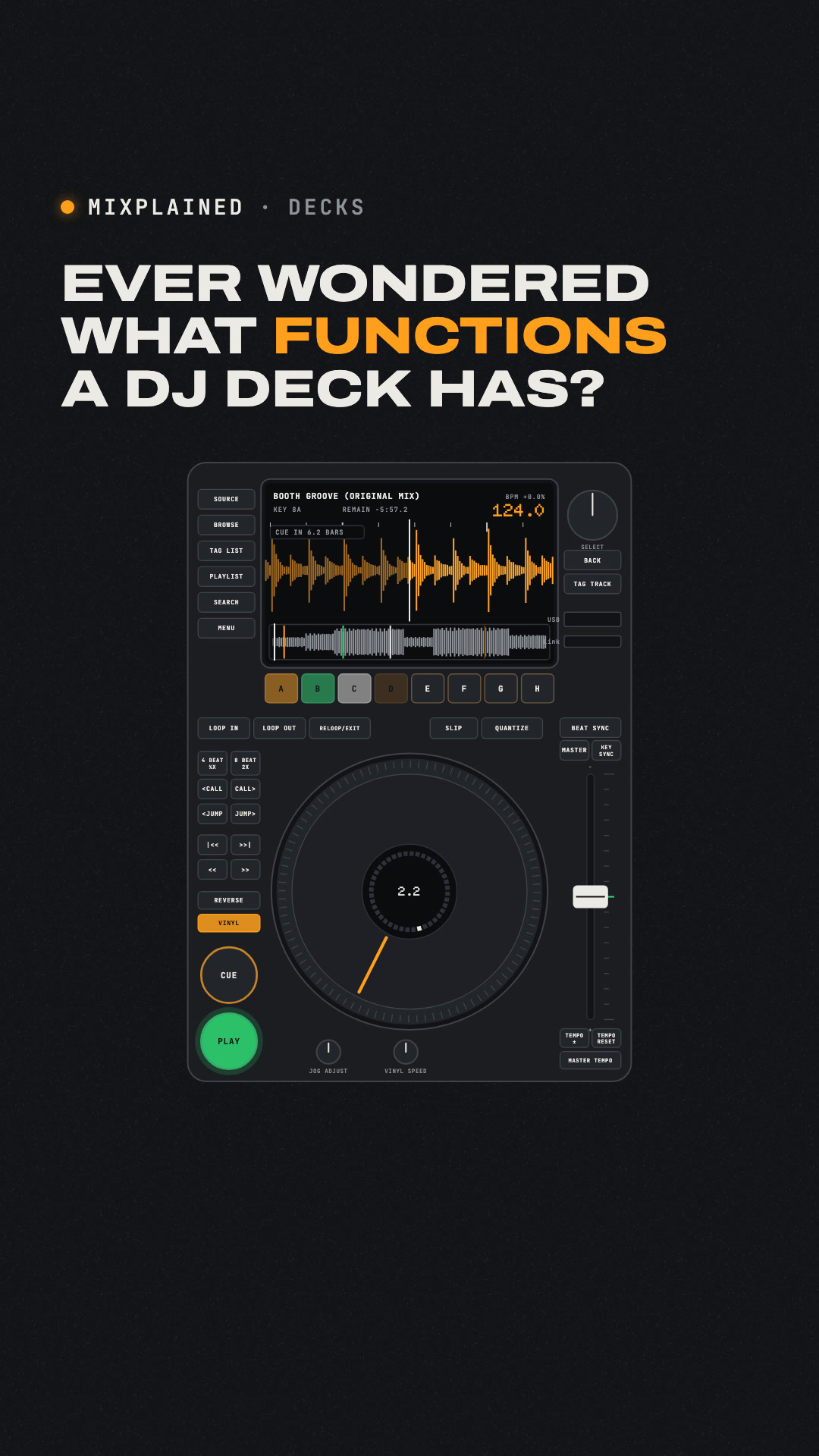
Every function on a club DJ player, zone by zone: loading, the screen and countdown, play and cue, needle search, the jog wheel, tempo and master tempo, sync, hot cues, loops, beat jump, slip and quantize.
Learn the buttons. Then play the room.
Facts
- A club player's screen shows the track, BPM, key and time, a zoomed waveform, the whole track as an overview, and a countdown in bars and beats to the next saved cue (CDJ-3000 manual).
- CUE while paused sets the cue point, snapped to the beat with Quantize on; CUE while playing jumps back to it and pauses (rekordbox calls it Back Cue); holding CUE plays from it until you let go (Cue Point Sampler). Tapping the overview to jump works while paused, or while holding the platter in Vinyl mode.
- In Vinyl mode, pressing the top of the jog wheel stops and scratches the track; turning its outer edge bends the speed to line up beats. The tempo slider's range switches between ±6, ±10, ±16 % and WIDE (±100 %); Master Tempo keeps the pitch when the tempo changes.
- Beat Sync matches tempo and beat position to the sync master, but only for tracks analysed in rekordbox. The CDJ-3000 (2020) has eight hot cues, A–H – twice as many as the CDJ-2000NXS2.
- The 4 and 8 BEAT LOOP buttons start a loop in one press and, during a loop, halve (1/2X) or double (2X) it. Beat Jump moves 16 beats from the factory (½ to 64). Slip keeps the track playing silently so it resumes where it would have been; Quantize snaps cues, loop points and hot cues to the beat.
- The CDJ-3000X (2025) has a 10.1-inch screen and no SD slot. Makers name things differently: Master Tempo is Key Lock on Denon players.
Sources
- AlphaTheta (Pioneer DJ): CDJ-3000 Instruction Manual (DRI1586-A, 2020) · AlphaTheta checked 6 October 2026
- AlphaTheta: CDJ-3000X Instruction Manual (DRI1956-C) · AlphaTheta checked 6 October 2026
- AlphaTheta: rekordbox Instruction Manual (ver. 7.2.18) · AlphaTheta checked 6 October 2026
- Denon DJ: SC6000/SC6000M/SC5000/SC5000M PRIME User Guide (v5.0.0) · Denon DJ (inMusic) checked 6 October 2026
- Pioneer DJ News: A New Dimension – the CDJ-3000 has landed (2020) · Pioneer DJ checked 6 October 2026
- Pioneer DJ: CDJ-3000 product page · Pioneer DJ checked 6 October 2026
- Digital DJ Tips: AlphaTheta launches CDJ-3000X with huge screen & new cloud features (2025) · Digital DJ Tips checked 6 October 2026
Based on the CDJ-3000 and 3000X manuals; other players name and place these controls differently.
All sound is original: synthesised for the episode, no samples, no licensed tracks. The narrator’s voice is AI-generated. General information. Features differ by software, player and version – check your own manual. Read how facts are checked and corrected.
Script
Ever wondered what functions a DJ deck has? Tracks load from a USB stick, or over a network cable from another deck or a laptop. Turn the big knob to browse, and press it to load. The screen shows the track, BPM, key and time left. A zoomed waveform scrolls past, and a strip shows the whole track. A countdown shows bars and beats to your next saved cue. Play starts and pauses. While paused, Cue sets your start point. Paused, you can also tap the strip to jump anywhere. Press Cue while playing: it jumps back there and stops. Hold it to listen; let go and it snaps back. In vinyl mode, press the top of the jog wheel to stop and scratch. Turn its edge to nudge the speed and line up the beats. The tempo slider changes speed: up to 16 % either way, or 100 on Wide. Master tempo keeps the key when the speed changes. Sync matches the master deck's tempo and beats, if the track's been analysed. Eight hot cues jump straight to saved spots. Loop in and loop out repeat a section. The 4- and 8-beat buttons loop in one press, then halve or double it. Beat jump skips 16 beats either way, unless you change it. Slip keeps the track running silently underneath, so you land back in time. Quantize snaps cues and loops to the beat. Plus reverse, track search, tempo reset and key sync. Learn the buttons. Then play the room. Follow for the next cue.
Sources last checked 6 October 2026.